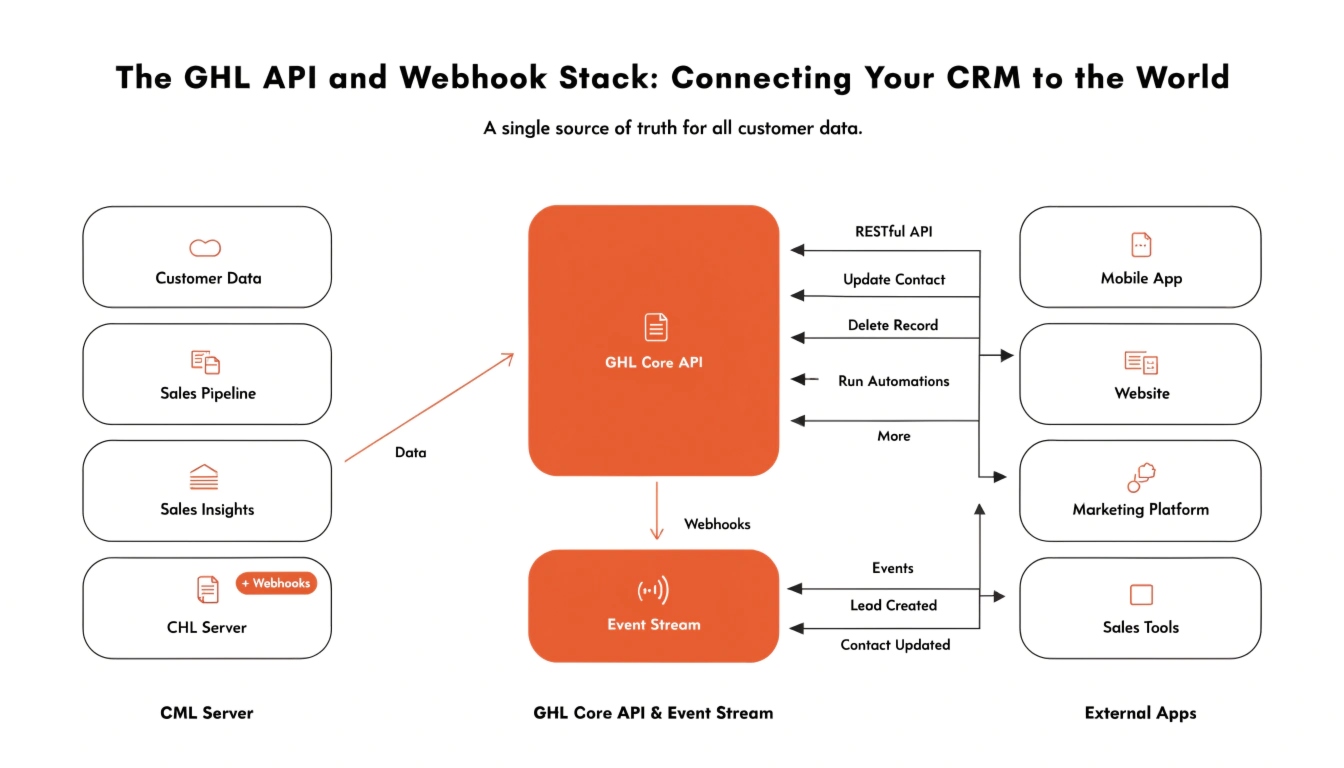
The GHL API and Webhook Stack: Connecting Your CRM to the World
In 2026, no software should live on an island. While the GoHighLevel features are massive, you may still need to send data to a specialized accounting tool, a custom mobile app, or a third-party shipping service. This is where the GHL API and Webhook Stack becomes the most powerful tool in your belt.
By mastering these technical connections, you can build a truly “headless” business where data flows seamlessly between different platforms without any manual export-import work.
Understanding the GHL V2 API
The Application Programming Interface (API) is the language that different softwares use to talk to each other. In 2026, GHL uses the V2 API, which is faster and more secure than older versions.
Using Webhooks for Real-Time Speed
If an API is a “Question,” a Webhook is a “Notification.” Instead of your other software constantly asking GHL, “Is there a new lead?”, GHL “pushes” the data to the other software the second it happens.
Common 2026 Webhook Use Cases:
The “Inbound Webhook” Trigger
In 2026, you can also send data into GHL from outside sources. This is done using the “Inbound Webhook” trigger in the AI Workflow Stack.
Technical Integration Comparison
When should you use a direct integration versus a Webhook or API? Use this table to decide for your next project.
| Integration Method | Technical Difficulty | Best Use Case |
| Native Integration | Low | Connecting Google, Meta, or Slack. |
| Zapier / Make | Medium | Quick connections between 6,000+ apps. |
| GHL Webhooks | High | Sending real-time data to a custom URL. |
| GHL V2 API | Very High | Building your own custom apps or tools. |
Frequently Asked Questions (FAQ)
What is an API Key?
In 2026, GHL has moved away from simple “API Keys” to “Location IDs” and “Access Tokens” for better security. You can find these in your “Settings” under the “Business Profile” and “Developer” tabs.
Can I connect GHL to my own custom mobile app?
Yes! Most developers use the V2 API to sync the GHL CRM data with a custom-built iOS or Android application.
Is there a limit to how many Webhooks I can use?
While GHL is very generous, it is best practice to only trigger Webhooks for essential data to keep your AI Workflow Stack running at peak speed.
Summary: Scaling Beyond the CRM
The GHL API and Webhook Stack is what separates basic users from “Power Users.” When you can move data freely between systems, you remove all human error and create a business that is truly automated. In 2026, the agencies that win are the ones with the most efficient data systems.