The 72-Hour Onboarding Machine: Scale Your GHL Agency Without Chaos
Most agencies hit a “growth ceiling.” You get to 10 clients, and suddenly, you are drowning in emails, login requests, and setup calls. You can’t take on more work because you are too busy doing the “grunt work.”
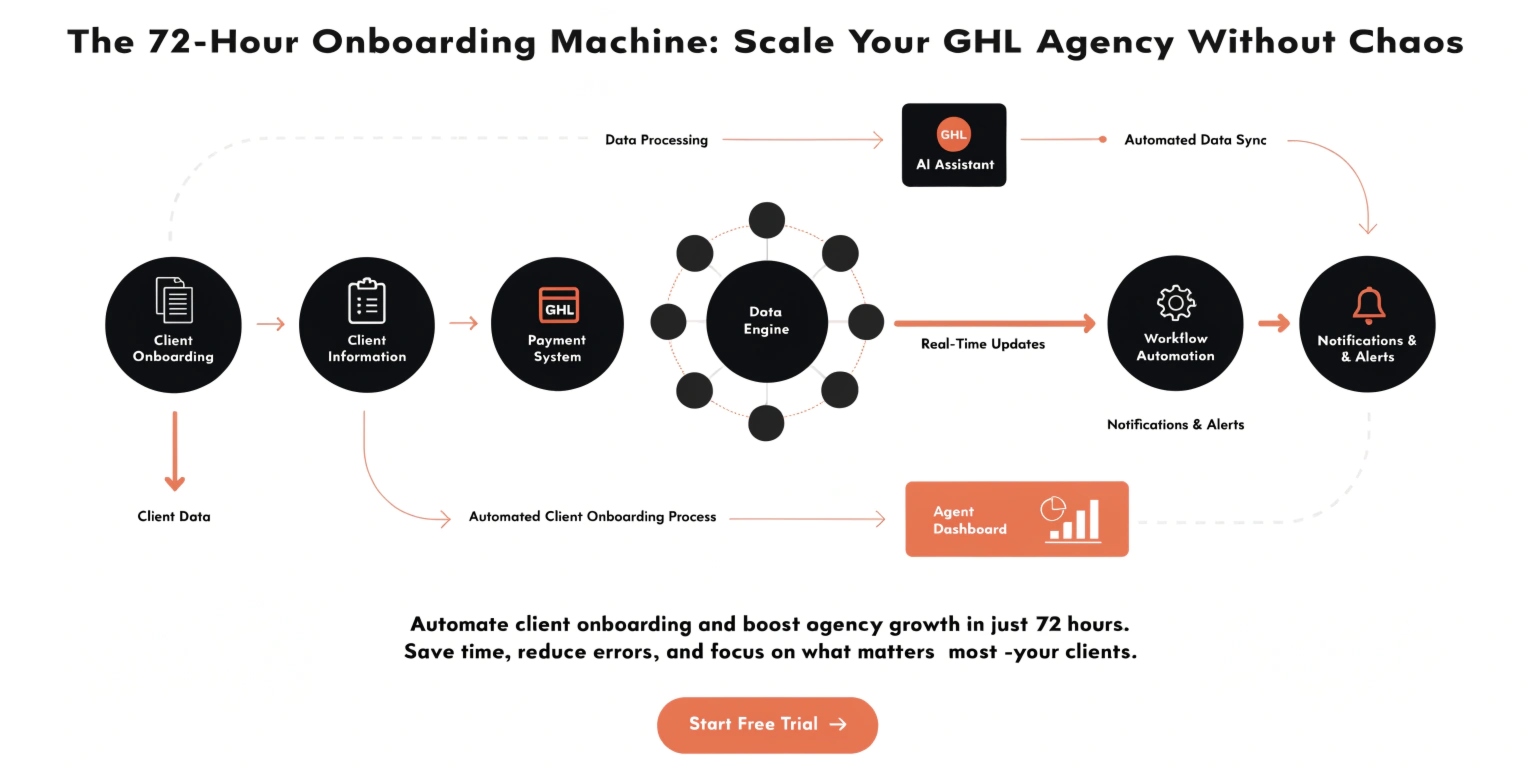
In 2026, the secret to scaling is the 72-Hour Onboarding Machine. By using your GHL Stack, you can move a client from “Contract Signed” to “Fully Live” in under three days—with almost zero manual input.
Why Manual Onboarding Kills Your Profit
When you onboard manually, you lose money in three ways:
The 6-Phase “Zero-Touch” Onboarding Flow
We break onboarding down into a simple pipeline. You can build this using Workflows in your Agency Dashboard.
| Phase | Goal | Automation Method |
| Intake | Collect brand info | Send GHL Form via Email |
| Provisioning | Create Sub-Account | Trigger “Create Account” Workflow |
| Snapshot | Apply your System | Auto-load your “Master Snapshot” |
| Integrations | Connect Socials/GMB | Send “Client Setup” Video Guide |
| Compliance | A2P/Phone Setup | Trigger “Compliance Task” for Client |
| Launch | Go Live | Move Pipeline to “Live” Stage |
How to Build Your “Intake” System
Don’t ask clients for their brand colors over email. It’s messy. Instead, use a GHL Intake Form.
What to Ask in Your Intake Form:
When they hit “Submit,” your GHL Workflow automatically tags them as “Form Completed” and triggers the account creation. You don’t have to do a thing.
Read this: GHL Snapshots: The “Secret Sauce” for Scaling Your Agency in 2026
The “One-Video” Training Strategy
Don’t do a 1-hour “walkthrough call” for every new client. It doesn’t scale.
Instead, record one high-quality video that covers:
Host this video on a GHL Membership page. When a client finishes onboarding, the workflow automatically sends them their login credentials and the link to this course. Now, they are trained, and you are free to work on your business.
Handling the “Hard” Tech (A2P & Domains)
The biggest hurdle for new GHL users is A2P 10DLC Registration (the rules for sending business texts). If you try to explain this on a call, it takes forever.
The “Cheat Sheet” Approach:
This approach puts the responsibility on the client while keeping them guided.
Avoiding “Onboarding Burnout”
Burnout happens when you are a “glorified customer support agent.” To avoid this:
Frequently Asked Questions
What happens if the snapshot fails?
Always have a “Backup” snapshot. If one fails, you can simply “Re-Sync” the snapshot from your agency dashboard.
Do I really need to do a kickoff call?
You can if you want to! But in 2026, many successful SaaS agencies offer a “Live Q&A” call twice a week for all new clients, rather than individual kickoff calls. It saves you dozens of hours a month.
How do I handle clients who don’t fill out the form?
Set an automated “Nudge Sequence.” If the form isn’t filled in 24 hours, the system sends an SMS: “Hi [Name], we’re ready to start your setup! Please fill out the form here so we don’t lose your spot in our launch queue.”
Read this: Advanced GHL Stack: Scaling with n8n and Custom APIs
Summary: Your Path to 100+ Clients
The 72-Hour Onboarding Machine is the difference between a “freelancer” and a “software owner.” By automating the boring, repetitive parts of the setup, you spend your energy on the big wins: strategy, high-ticket sales, and actually delivering results for your clients.